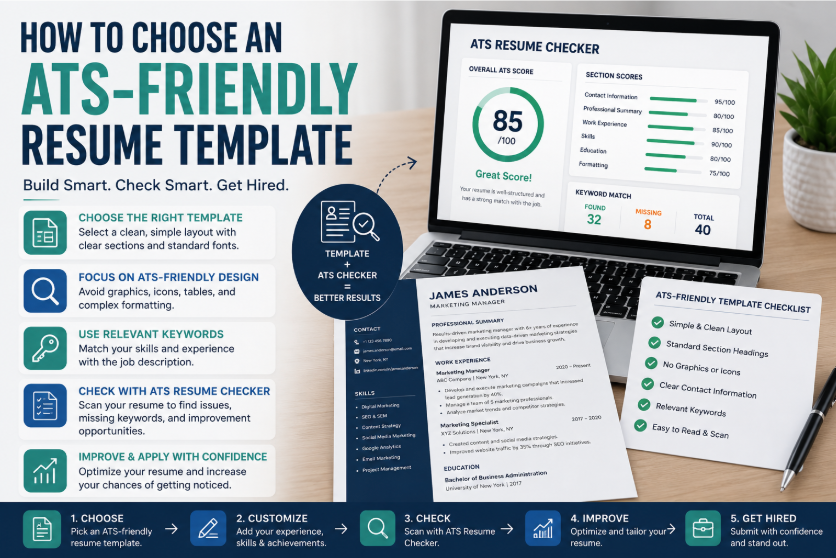
Creating a resume is no longer just about writing your experience on a page. Today, job seekers need to create resumes that are professional, easy to read, and compatible with Applicant Tracking Systems. Many companies now use hiring software to scan resumes before recruiters review them. This means your resume must be designed for both technology and human decision-makers.
A resume template can help you create a professional layout quickly, but not every template is good for online job applications. Some designs look attractive but may not be easy for ATS software to scan. That is why job seekers should not only use a good resume template but also test the final document with an ATS resume checker.
Using an ATS resume checker from MyCVCreator can help you review your resume, identify missing keywords, detect formatting issues, and improve your chances of passing the first stage of the hiring process.
Why Your Resume Template Matters
A resume template gives structure to your career information. It helps you organize your name, contact details, summary, work history, education, skills, certifications, and achievements in a clear format.
However, a resume template does more than make your resume look good. The right template can make your resume easier to read, easier to scan, and easier for recruiters to understand. The wrong template can create problems, especially when applying through online job portals.
A poor resume template may include:
- Too many graphics
- Complicated columns
- Text boxes
- Tables that do not parse correctly
- Icons instead of written contact details
- Unclear section headings
- Decorative fonts
- Important information placed inside images
These design features may look modern, but they can reduce ATS readability. A clean template is often better than a heavily designed one.
See also: Why HK Serviced Apartment Living Is Becoming Increasingly Popular
What Makes a Resume Template ATS-Friendly?
An ATS-friendly resume template is simple, structured, and easy for hiring software to read. It does not hide important information behind complex formatting.
A strong ATS-friendly resume template should include:
1. Clear Section Headings
Use standard headings such as:
- Professional Summary
- Work Experience
- Skills
- Education
- Certifications
- Projects
These headings help ATS software understand the content of your resume. Avoid creative headings like “My Career Story” or “What I Can Do,” because they may not be recognized correctly.
2. Simple Layout
A clean layout improves readability. One-column templates are usually the safest option for ATS systems. A simple two-column format may also work if it is properly structured, but job seekers should always test it before applying.
3. Standard Fonts
Use readable fonts such as Arial, Calibri, Times New Roman, Georgia, or similar professional fonts. Avoid decorative fonts that may not display correctly across different systems.
4. Normal Bullet Points
Bullet points help recruiters scan your achievements quickly. Use simple bullet points rather than unusual symbols, emojis, or icons.
5. Real Text Instead of Images
Your resume should contain real selectable text. Do not place your name, skills, contact details, or work experience inside images, because ATS tools may not read image-based text properly.
6. Clear Contact Information
Your name, email address, phone number, location, and professional profile link should be placed clearly near the top of the resume. Avoid putting contact information only in the header or footer.
Why You Should Check Your Resume After Using a Template
Even if your template looks professional, it may still have hidden issues. An ATS resume checker helps you test the resume before sending it to employers.
The checker can help you discover:
- Whether your resume is readable
- Whether important sections are missing
- Whether your skills match the job description
- Whether your formatting may cause problems
- Whether your resume includes relevant keywords
- Whether your work experience is clearly structured
- Whether your resume needs stronger achievements
- Whether your document is optimized for ATS screening
This gives you practical feedback before you apply.
Resume Template Design vs. Resume Performance
Many job seekers focus too much on design and not enough on performance. A beautiful resume is useful, but it must also help you get interviews.
A resume that looks attractive but cannot be scanned properly may hurt your chances. On the other hand, a simple, professional resume that is easy to read and keyword-optimized can perform better in online applications.
The best resume template balances both design and functionality. It should look clean and modern, but it should also be easy for ATS systems and recruiters to understand.
How an ATS Resume Checker Helps Improve Job Matching
One of the most useful features of an ATS resume checker is job matching. When you compare your resume with a job description, you can see how closely your resume aligns with the role.
For example, if a job description asks for skills such as project management, data analysis, customer service, Microsoft Excel, team leadership, or digital marketing, your resume should include relevant terms if they apply to your experience.
An ATS checker can show which keywords are already present and which important ones may be missing. This helps you tailor your resume for the specific job instead of sending a general document.
The Problem With Generic Resumes
Many job seekers make the mistake of using one resume for every application. This may save time, but it often reduces results.
Different jobs require different skills. A resume for a sales role should not be exactly the same as a resume for an administrative role. A resume for a software developer position should not use the same keyword focus as a resume for a customer support position.
A resume template gives you a strong base document. An ATS checker helps you customize that document for each job application.
This combination can help you apply more strategically.
How to Use MyCVCreator to Build and Check Your Resume
MyCVCreator makes it easier for job seekers to create and improve professional resumes. You can use resume-building tools to organize your information and then review your document with the ATS Resume Checker.
Here is a simple process:
Step 1: Choose a Professional Resume Template
Start with a clean and readable resume template. Make sure it includes the right sections for your career level and industry.
Step 2: Add Your Career Information
Fill in your work experience, education, skills, certifications, projects, and achievements. Focus on accurate and relevant details.
Step 3: Tailor Your Resume to the Job
Read the job description carefully. Identify the most important skills, responsibilities, and qualifications. Update your resume so it reflects the role you want.
Step 4: Run the Resume Through an ATS Checker
Use MyCVCreator’s ATS Resume Checker to scan your resume. The tool can help identify formatting risks, keyword gaps, and improvement areas.
Step 5: Improve the Resume Based on the Results
Update weak sections, add relevant keywords naturally, simplify formatting, and improve your bullet points.
Step 6: Check Again Before Applying
After editing, run another check to confirm that your resume is stronger and better aligned with the job.
What to Include in an ATS-Friendly Resume
A strong resume should include the right sections and enough detail to show your value.
Professional Summary
Your summary should quickly explain your career focus, experience, and strongest skills.
Example:
“Detail-oriented administrative assistant with experience in office coordination, document management, scheduling, customer support, and data entry. Skilled in improving workflow efficiency, managing records, and supporting daily business operations.”
Skills Section
Your skills section should include relevant hard skills, tools, and soft skills. Make sure the skills match the job you are targeting.
Work Experience
Your work experience should show what you achieved, not only what you were responsible for. Use action verbs and include numbers where possible.
Weak example:
“Handled customer complaints.”
Stronger example:
“Resolved customer complaints through phone and email support, improving customer satisfaction and reducing repeat issues.”
Education
Include your school, degree, field of study, and graduation year where necessary. You can also include relevant coursework for entry-level roles.
Certifications
Certifications can improve your resume, especially when they match the job description. Include the certification name, issuing organization, and date if relevant.
Best Resume Template Tips for ATS Success
Here are practical tips to help job seekers choose the right resume template:
- Choose clean over complicated
- Use clear section titles
- Avoid too many design elements
- Keep contact details easy to find
- Use standard fonts
- Save the file in an accepted format
- Avoid large images and icons
- Keep bullet points simple
- Use relevant keywords naturally
- Check the resume before applying
These simple steps can help your resume perform better in online applications.
Why Job Seekers Should Use an ATS Checker Before Every Important Application
Every job application is different. Even if your resume is already well-written, it may need small updates for each role. An ATS resume checker helps you make those updates with more confidence.
Before applying, job seekers should ask:
- Does my resume match this job description?
- Did I include the right skills?
- Is my resume easy to scan?
- Are my achievements clear?
- Did I use an ATS-friendly template?
- Are there missing keywords?
- Is my contact information readable?
Checking your resume before applying can prevent avoidable mistakes.
Final Thoughts
A resume template helps you create a professional document, but an ATS resume checker helps you make sure the document is ready for today’s hiring process. Job seekers who use both tools have a better chance of creating resumes that are clear, organized, keyword-focused, and compatible with online applications.
The modern job market is competitive, and small resume mistakes can reduce your chances of getting noticed. By using an ATS-friendly resume template and testing your resume with MyCVCreator’s ATS Resume Checker, you can improve your application and apply with more confidence.
Before submitting your next job application, build your resume with a clean template, tailor it to the role, and check it for ATS performance. This simple process can help you create a resume that works better for both hiring software and recruiters.
Author Bio
MyCVCreator is a career development platform that helps job seekers create professional resumes, cover letters, resume websites, and job application documents. With tools such as resume templates, an ATS Resume Checker, cover letter builder, and interview preparation resources, MyCVCreator supports candidates in building stronger applications and improving their career opportunities.
